
Camly photo editor & collages2.3.2 - Google Play
You'll be able to see results in few seconds.
Publisher Description


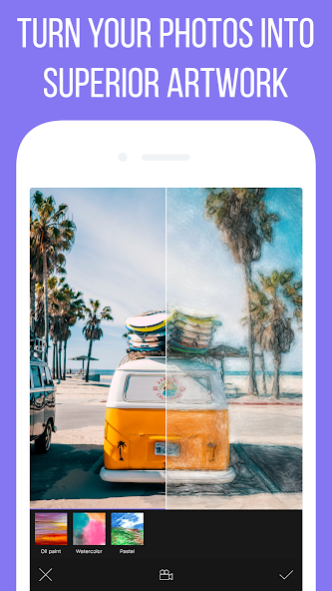
Camly is an awesome photo editing app that combines professional editing tools and simplicity of usage.
UNIQUE FILTERS AND STYLISH EFFECTS FOR PHOTO
Camly lets you use various effects for pictures including unique filters that can easily make your photo special.
Filter packs were created by a team of professional photographers and compile their long photo editing experience. Use the results of their work to give a desirable look to your photo!
We created the following photo effects for you: light leaks effects, vintage, retro, selfie photo effects, black and white effects, color balance and others amazing filters for photos!
STYLISH STICKERS AND CAPTIONS
Camly has a set of stickers that can turn your photo into an exciting story. You’ll be pleasantly surprised by our stickers. We have everything from hipster moustache to hearts and flowers and even fairy tale characters.
Camly lets you add beautiful captions so that you could express all your emotions on the photo.
PROFESSIONAL EDITING
Camly has a set of professional editing tools especially for the delicate adjustment fans. With Camly you can edit brightness, contrast, optical exposure, light and shadows, hue, colour temperature(warmth), saturation, acutance. You can also use vignette, cutting and rotating tools including straightening the horizon, Fisheye, barrel and pincushion distortion, keystone distortion, blur, tilt-shift and other useful settings.
COLLAGE MAKER
When one photo is not enough to express all your ideas use collages. We’ve created a huge number of collages for every life situation. Create your own unique photo collage with Camly using our best layouts!
BACKGROUND IMAGE FRAMES FOR PHOTOS
Add new colours to your photo by putting it in a photo frame. You can choose the most suitable background picture and add bright creative hues to your photo. You can try various borders for pictures using our app.
Use our frames for pictures to post entire photos to social networks.
FAST POSTING OF THE RESULT IN SOCIAL NETWORKS
You can save the edited photo on your phone or share it with friends by posting in your favourite social networks.
Use #Camly when posting photos. We’ll find your photos and post the best ones in our popular accounts with thousands of followers mentioning you as an author.
Moreover, using #Camly you help spreading the application through your friends who will thank you for a great recommendation.
- Privacy policy: http://camlyapp.com/docs/privacy.pdf
Follow us in social networks:
Instagram: http://instagram.com/camlyapp
Facebook: https://www.facebook.com/camlyapp
About Camly photo editor & collages
The company that develops Camly photo editor & collages is Camly. The latest version released by its developer is 2.3.2.
To install Camly photo editor & collages on your Android device, just click the green Continue To App button above to start the installation process. The app is listed on our website since 2020-04-30 and was downloaded 0 times. We have already checked if the download link is safe, however for your own protection we recommend that you scan the downloaded app with your antivirus. Your antivirus may detect the Camly photo editor & collages as malware as malware if the download link to com.camlyapp.Camly is broken.
How to install Camly photo editor & collages on your Android device:
- Click on the Continue To App button on our website. This will redirect you to Google Play.
- Once the Camly photo editor & collages is shown in the Google Play listing of your Android device, you can start its download and installation. Tap on the Install button located below the search bar and to the right of the app icon.
- A pop-up window with the permissions required by Camly photo editor & collages will be shown. Click on Accept to continue the process.
- Camly photo editor & collages will be downloaded onto your device, displaying a progress. Once the download completes, the installation will start and you'll get a notification after the installation is finished.
Program Details
System requirements
Download information
Pricing
Version History
version 2.3.2
posted on 2020-04-30
We're happy to introduce new Retro Filters Pack that add nostalgic feel on to your photos
New tool: Low Poly
version 2.3.2
posted on 2020-04-30
We're happy to introduce new Retro Filters Pack that add nostalgic feel on to your photos
New tool: Low Poly
version 2.3
posted on 2020-01-07
Introducing new Selfie tool!
Face Recognition using Artificial Intelligence helps to make your skin smoother and perfect, eyes more radiant that gives you effect of professional photography
version 2.2
posted on 2019-12-27
Bug fixes
version 2.1.6
posted on 2019-04-03
- Added new powerful "Face plastic" tools
- Improved HSL effect
- Changed the way to interact with filters. User experience has been enhanced for your convenience and ease-of use
- Now you can make a collection of your favorite filters
- Added new feature "Visual history"
- Improved the Crop tool
version 1.9
posted on 2015-11-24
We are excited to announce the biggest update since the first version of Camly!,The following features and improvements were implemented:,- Saving images in High-Resolution,- Now you can manually set resolution and file format like .PNG or .JPEG,- We are happy to present you Local Adjustments!,- We have added Curves,- Added Fade effect,- Added ability to Manage filters,- We have added a great variety of decorative borders for images,- Other new features, Improvements and Bug Fixes
Disclaimer
Official Google Play Link
We do not host Camly photo editor & collages on our servers. We did not scan it for viruses, adware, spyware or other type of malware. This app is hosted by Google and passed their terms and conditions to be listed there. We recommend caution when installing it.
The Google Play link for Camly photo editor & collages is provided to you by apps112.com without any warranties, representations or guarantees of any kind, so access it at your own risk.
If you have questions regarding this particular app contact the publisher directly. For questions about the functionalities of apps112.com contact us.
